

Hikvision AcuSense NVR Range 2026: Which K-Series, PoE or VPRO Model Fits Your Site


Hikvision AcuSense NVR Range 2026: Which K-Series, PoE or VPRO Model Fits Your Site
Last updated: 29 April 2026. Written for UK CCTV installers specifying Hikvision NVRs against real site sizes, from 4-camera retail jobs to 32-camera commercial estates.
At a glance
- Hikvision AcuSense NVRs are the recorders that classify human and vehicle targets at the NVR rather than relying on the camera, so older non-AcuSense Hikvision IP cameras still get false-alarm reduction.
- Range covers four channel counts in 2026: 4-ch (DS-7604NXI-K1), 8-ch (DS-7608NXI-K1 and DS-7608NXI-I2/VPRO), 16-ch (DS-7616NXI-K2, DS-7616NXI-I2/VPRO, DS-7716NXI-K4 and DS-7716NXI-I4/VPRO) and 32-ch (DS-7732NXI-K4 and DS-7732NXI-I4/VPRO).
- K-series = good-value AcuSense, suits sites mixing legacy and AcuSense cameras. I-series VPRO with AcuSeek = AI text/voice video search, future-proofs estates that will roll out AcuSense or higher-tier AI cameras.
- PoE versions (suffix /4P, /8P, /16P) ship with a built-in plug-and-play switch — quickest install for residential or single-rack jobs. Non-PoE versions pair with an external Hikvision or Reyee PoE switch when you need more headroom.
- Same-day dispatch from Netview's Leicester warehouse on every model below — call 01163 800 838 for trade pricing.
What "AcuSense NVR" actually means in 2026
An AcuSense NVR runs Hikvision's deep-learning classifier on the recorder, not the camera. That matters for two reasons. First, it lets installers retrofit AcuSense behaviour into estates that still run older, non-AcuSense Hikvision IP cameras — the classifier sees the standard H.265 stream and decides whether each motion event was a person, a vehicle or weather. Second, it offloads classification from the camera, freeing up bitrate and CPU on the camera side. Hikvision's K-series and I-series AcuSense NVRs both implement this; the difference between them is the AI scope, the GUI generation and the channel/HDD ceilings (Hikvision K-Series AcuSense overview).
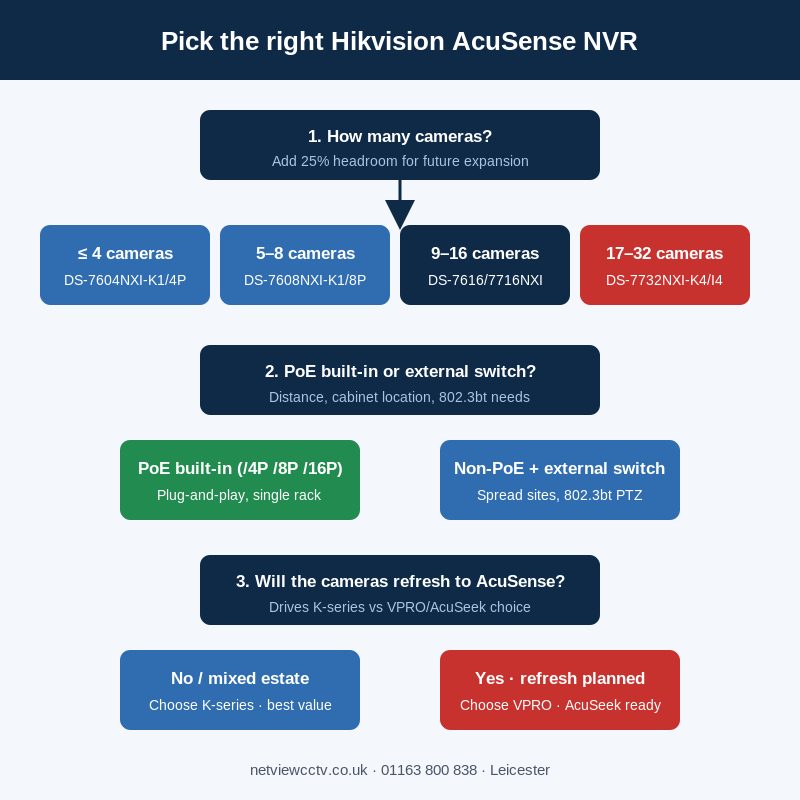
The 2026 line-up adds the VPRO series with AcuSeek on top. AcuSeek is Hikvision's multimodal AI video search — type "red car at the front gate yesterday afternoon" and the NVR returns the matching clips, instead of you scrubbing 24 hours of footage. Hikvision states that to get full-channel AcuSeek, the NVR has to be paired with AcuSense or higher-tier AI cameras (Hikvision VPro AcuSeek series page). For installers, the practical question is whether the customer will roll out AcuSense cameras over the next refresh cycle — if yes, fit a VPRO now and they have AcuSeek waiting for them.
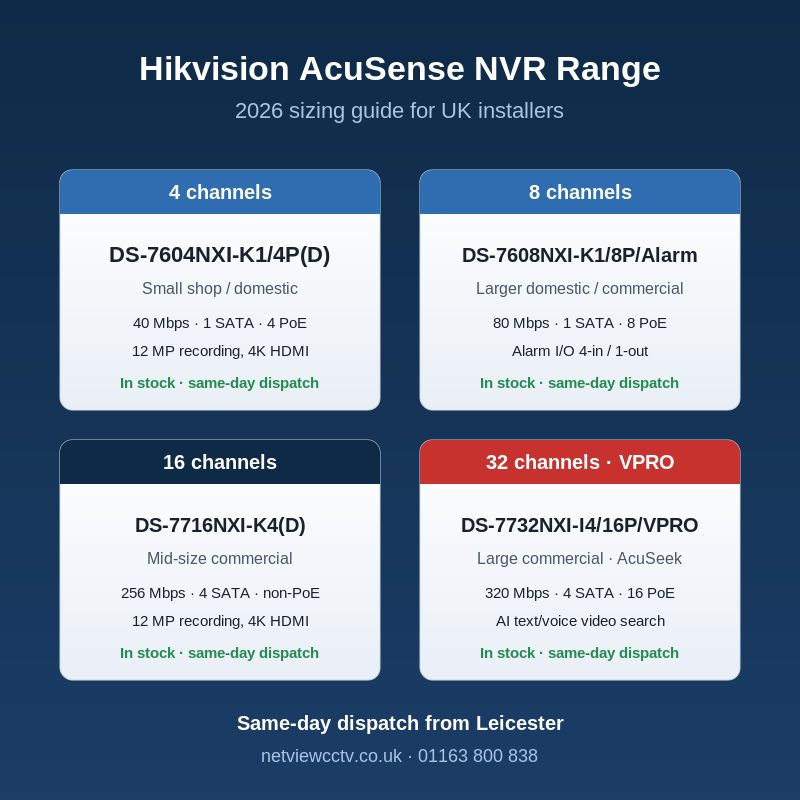
How to size by channel count: 4, 8, 16 or 32
The right NVR is the one with at least one channel left empty after every camera is plugged in, plus headroom for the next two years. Hikvision's NXI range steps in standard sizes — 4, 8, 16 and 32 — and each step roughly doubles the bandwidth ceiling.
| Site size | Recommended channel count | Typical Netview pick |
|---|---|---|
| Small flat / shop / single domestic dwelling (1–4 cameras) | 4-ch | DS-7604NXI-K1/4P(D) |
| Larger domestic / small commercial (5–8 cameras) | 8-ch | DS-7608NXI-K1/8P(D)/Alarm4+1 or DS-7608NXI-I2/8P/VPRO |
| Mid-size commercial / industrial (9–16 cameras) | 16-ch | DS-7616NXI-I2/16P/VPRO or DS-7716NXI-K4(D) |
| Larger commercial / multi-building (17–32 cameras) | 32-ch | DS-7732NXI-K4(D) or DS-7732NXI-I4/16P/VPRO |
The trap installers walk into is buying exactly to size. A 4-ch NVR fully populated with four cameras leaves no room for the customer adding a doorbell two months later, and an 8-ch NVR is usually only £30–£50 more. Step up one tier whenever the budget allows — every Hikvision NVR Netview ships supports adding cameras later without re-licensing.
K-series versus I-series VPRO with AcuSeek
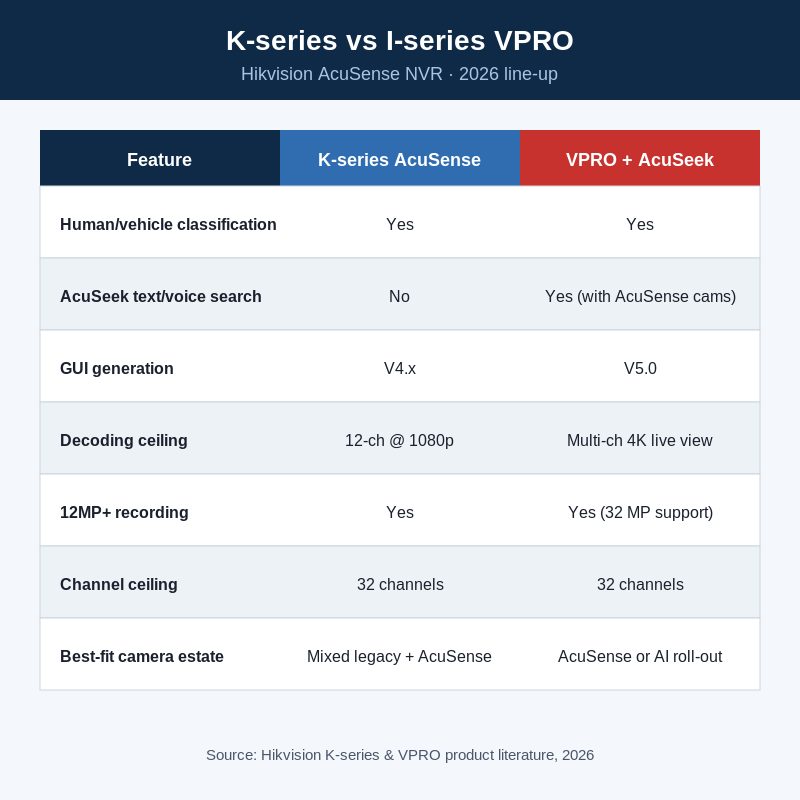
The single most common question installers ask in 2026 is whether to fit a K-series NVR or pay the premium for an I-series VPRO. The honest answer is that the spec gap is narrower than the marketing suggests, but AcuSeek is a real differentiator for sites that will see AcuSense cameras rolled out.
The K-series AcuSense NVRs use the V4.x GUI, run human/vehicle classification at the NVR, and support 4K HDMI output, H.265+ recording and Hik-Connect P2P. The I-series VPRO models add AcuSeek's text/voice video search, support the new V5.0 GUI, and have higher decoding capacity for multi-channel 4K live view. Hikvision's own UK product literature recommends K-series when the camera estate is mostly older non-AcuSense models, and I-series when the estate is being refreshed onto AcuSense or higher (Hikvision AcuSense NVR series page).
| Feature | K-series | I-series VPRO with AcuSeek |
|---|---|---|
| Human/vehicle AcuSense classification | Yes | Yes |
| AcuSeek text/voice video search | No | Yes (with AcuSense cameras) |
| GUI generation | V4.x | V5.0 |
| Decoding ceiling | Up to 12-ch @ 1080p (1.5U models) | Up to 32MP, multi-4K live view |
| Best fit | Mixed-vintage Hikvision IP estate, value jobs | AcuSense/AI camera roll-out, future-proof commercial |
SATA bays and storage: how many drives do you actually need
HDD bay count caps how much footage the NVR can hold and how you can configure RAID/redundancy. The Hikvision K-series steps from one bay (1U 4-ch and 8-ch chassis) up to four bays (1.5U 16-ch and 32-ch chassis). The 4-ch DS-7604NXI-K1/4P supports a single SATA HDD up to 10 TB (DS-7604NXI-K1/4P spec listing), the 16-ch and 32-ch K4 models accept four drives at up to 10 TB each (Hikvision DS-7716NXI-K4 datasheet PDF).
For UK installs the practical sizing rule is: four 4 MP H.265+ AcuSense cameras at 6 Mbps continuous record produce roughly 250 GB per camera per month. A single 4 TB drive in a DS-7604NXI-K1/4P holds ~16 weeks of continuous recording for a 4-camera shop. A 32-ch site recording 4 MP cameras 24/7 will fill four 8 TB drives in ~10–12 weeks of continuous recording, so spec generously and use motion-only or AcuSense event-only recording where the customer's retention policy allows it.
PoE built-in or external switch: which is the right call
Every NVR Netview ships in this range comes in two flavours: built-in PoE (suffix /4P, /8P or /16P) and non-PoE (no suffix, pair with an external switch). Built-in PoE is faster to install — the cameras plug directly into the NVR rear ports and the NVR auto-discovers them. Non-PoE wins when the cameras are spread across the building further than 100 m from the NVR (you fit a PoE switch at the wiring closet and only one network cable returns to the NVR), when the customer wants the NVR off-site in a comms cabinet, or when you need 802.3bt high-power PoE for PTZs the built-in switch can't supply.
The DS-7716NXI-K4 chassis ships in both forms — the non-PoE DS-7716NXI-K4(D) for installs where the cameras come back via a separate Hikvision or Reyee switch, and the PoE-built-in DS-7716NXI-K4/16P(D) variant for direct camera connection. The 32-ch DS-7732NXI-K4(D) is non-PoE only at 32 channels — at that scale almost every installer routes via an external 24- or 48-port managed switch anyway.
Bandwidth and decoding: where AcuSense NVRs run out of room
The two specs that quietly cap an NVR are incoming bandwidth (total Mbps the NVR can record across all channels) and decoding capacity (how many simultaneous channels you can view live or in playback). Both scale with chassis tier:
| Model | Channels | Incoming bandwidth | Decoding (max) |
|---|---|---|---|
| DS-7604NXI-K1/4P(D) | 4 | 40 Mbps | 1-ch @ 12 MP / 10-ch @ 1080p |
| DS-7608NXI-K1/8P(D)/Alarm4+1 | 8 | 80 Mbps | 2-ch @ 12 MP / 12-ch @ 1080p |
| DS-7616NXI-K2/16P(D) | 16 | 160 Mbps | 2-ch @ 12 MP / 12-ch @ 1080p |
| DS-7716NXI-K4(D) | 16 | 256 Mbps | 2-ch @ 12 MP / 12-ch @ 1080p |
| DS-7732NXI-K4(D) | 32 | 256 Mbps | 2-ch @ 12 MP / 12-ch @ 1080p |
| DS-7616NXI-I2/16P/VPRO | 16 | 256 Mbps (32 MP support) | Multi-ch 4K live view + AcuSeek |
| DS-7716NXI-I4/16P/VPRO | 16 | 320 Mbps | Multi-ch 4K live view + AcuSeek |
| DS-7732NXI-I4/16P/VPRO | 32 | 320 Mbps | Multi-ch 4K live view + AcuSeek |
Bandwidth specs are taken from Hikvision's own datasheets including the DS-7616NXI-K2/16P datasheet PDF and DS-7732NXI-K4 datasheet PDF. The cleanest sanity check on a quote is to add up every camera's CBR bitrate and compare against the NVR's incoming bandwidth — leave 25% headroom for sub-stream and remote viewing.
Compatibility with Hikvision AcuSense, ColorVu and Live Guard cameras
Every NVR in this guide is fully compatible with Hikvision's current camera range, including the new 16 MP and 12 MP DS-2CD23166G3 / DS-2CD23126G3 AcuSense DarkFighter turrets, ColorVu 3.0 cameras and Live Guard models with strobe and audio. Where AcuSense behaviour comes from depends on what's plugged in: AcuSense cameras run the classifier on-board and the NVR just records the resulting events; non-AcuSense IP cameras get classified at the NVR. For a deeper comparison of when to use AcuSense versus ColorVu, see our AcuSense vs ColorVu installer comparison; for the wider AcuSense feature set, our complete AcuSense installer guide covers configuration, false-alarm tuning and AcuSense 3.0 AcuSearch.
Where these NVRs sit in the Hikvision firmware and management ecosystem
All current Hikvision AcuSense NVRs work with Hik-Connect P2P for remote viewing on iOS and Android, and with iVMS-4200 on the desktop. Firmware updates are pushed regularly — check our Hikvision firmware hub before commissioning a new install, and our Hikvision Tools hub for SADP, Batch Config and Password Reset utilities. For commissioning we recommend running the latest stable firmware on the NVR before the first AcuSense camera is paired — it avoids the V4 to V5 GUI mismatches that occasionally trip up first-time setups.
Frequently asked questions
Can I add an AcuSense camera to a non-AcuSense NVR?
Yes — any current Hikvision IP camera will pair with any current Hikvision NVR. You'll just lose the NVR-side AcuSense classification on the older NVR and rely on the camera doing it. Pairing an AcuSense camera with an AcuSense NVR is fine; both run their own classifier independently.
Do I need a VPRO NVR to use AcuSeek?
Yes. AcuSeek is the I-series VPRO feature — text/voice video search powered by Hikvision's multimodal AI. The K-series AcuSense NVRs do not have AcuSeek. To get full-channel AcuSeek, the VPRO NVR must be paired with AcuSense cameras or higher-tier Hikvision AI cameras (Hikvision VPro AcuSeek series).
Which NVR for a 12-camera commercial install?
Step up to a 16-channel — usually the DS-7616NXI-K2/16P(D) for value, or the DS-7716NXI-I4/16P/VPRO if the customer is rolling out AcuSense cameras over the next 18 months. The four extra channels give you headroom for additions and the I-series VPRO models give you AcuSeek as the camera estate refreshes.
Can I mix Hikvision IP cameras and HiLook IP cameras on one of these NVRs?
HiLook IP cameras pair fine with Hikvision NVRs (HiLook is a Hikvision brand and uses the same protocol stack), but third-party AcuSense behaviour is not guaranteed. Stick to Hikvision-branded AcuSense IP cameras for full classification at the camera; the NVR will still classify HiLook streams in software.
Do I need to pay for licensing per camera or per channel?
No. Hikvision's K-series and I-series AcuSense NVRs are licence-free for the channels listed on the chassis. Add cameras up to the channel count and there are no per-camera fees. Hik-Connect remote viewing is free for end users; iVMS-4200 is free for installers and integrators.
Can I migrate an existing 4-ch NVR's footage to an 8- or 16-ch upgrade?
Yes — Hikvision NVRs use a portable proprietary format. The simplest path is to physically move the existing SATA drives into the larger NVR (the file system is recognised) or to back up to USB before swapping the chassis. iVMS-4200 can also export discrete clips for archiving.
Order from Netview — same-day dispatch
Every Hikvision AcuSense NVR mentioned in this guide is held in stock at Netview's Leicester warehouse for same-day dispatch on orders placed before the cut-off. We're a Hikvision-approved authorised UK wholesaler, so warranty, RMA and trade pricing all run direct. Call the trade desk on 01163 800 838 to talk through the right NVR for a specific quote, or order online at netviewcctv.co.uk.


About the Author


