

Reyee RG-RAP2260 vs UniFi U6 Lite: Which Wi-Fi 6 AP Suits a Small CCTV Install?


If you are a UK CCTV installer adding wireless coverage alongside a camera installation, the Reyee RG-RAP2260 and the Ubiquiti UniFi U6 Lite will both appear on your shortlist. Both are 802.11ax Wi-Fi 6 ceiling-mounted access points powered by PoE+, but they differ on uplink speed, client capacity, management model, and total cost of ownership — all of which matter on a security install where reliability is non-negotiable. This guide maps each model against the real-world demands of a CCTV site: bandwidth headroom for camera streams, VLAN isolation, PoE switch compatibility, and ongoing remote management. Netview stocks the Reyee RG-RAP2260 for same-day UK dispatch — call 01163 800 838 or order from netviewcctv.co.uk.
At a glance
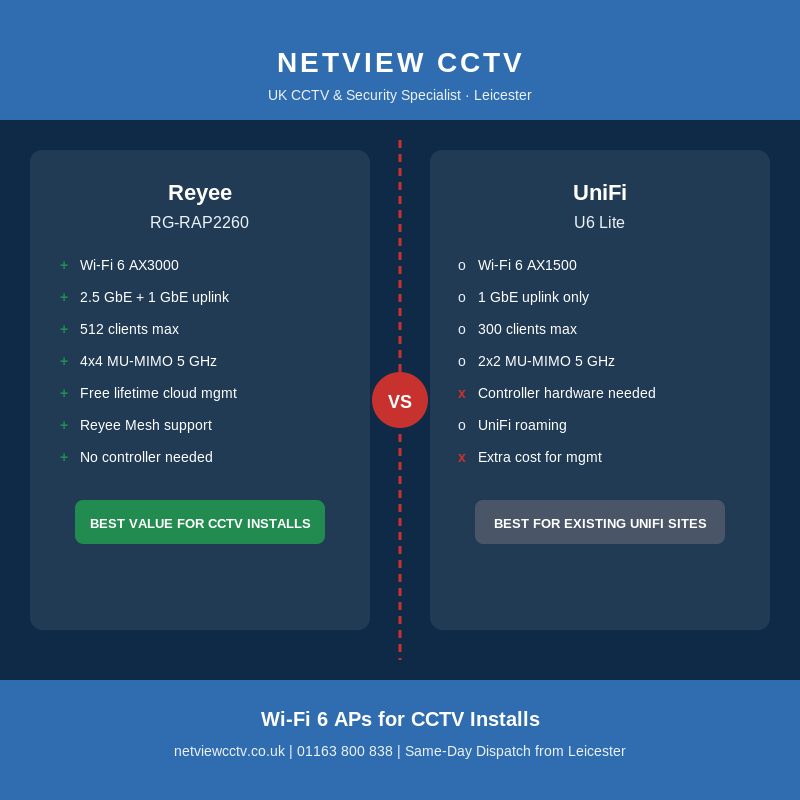
- Reyee RG-RAP2260 — Wi-Fi 6 AX3000, 2.5GbE uplink, up to 512 clients, free lifetime Reyee Cloud management with no controller hardware needed. The stronger choice for CCTV-first or single-vendor Reyee installs.
- UniFi U6 Lite — Wi-Fi 6 AX1500, 1GbE uplink, up to 300 clients, requires UniFi Network application (self-hosted or via cloud gateway). Best where a customer already has an established UniFi estate.
- Verdict: For most small UK CCTV installs the RG-RAP2260 outperforms on raw throughput and costs less to manage over a three-year site lifespan.
What is the Reyee RG-RAP2260 and what does it offer a CCTV installer?
The Reyee RG-RAP2260 is a Wi-Fi 6 (802.11ax) AX3000 dual-band ceiling access point from Ruijie Reyee, delivering up to 574 Mbps on 2.4 GHz and 2,402 Mbps on 5 GHz — a combined aggregate of around 2,976 Mbps — through a 4×4 MU-MIMO radio architecture (Ruijie Reyee RG-RAP2260 product page). It draws power over an 802.3at PoE+ uplink and offers two ports on the back panel: a 2.5 GbE PoE-in port for the primary uplink and a secondary 1 GbE port for daisy-chaining a downstream device. Client capacity is rated at up to 512 concurrent associations (Ruijie recommends a practical ceiling of 110 active clients per AP), which is ample for the typical CCTV site that also serves staff Wi-Fi and a handful of IoT devices. The AP runs entirely in standalone mode — commission it with the Ruijie Cloud app in about three minutes and it joins your existing Reyee Cloud account at no cost.
What does the UniFi U6 Lite offer in comparison?
The Ubiquiti UniFi U6 Lite is an AX1500 Wi-Fi 6 access point, combining a 2×2 2.4 GHz radio at 300 Mbps with a 2×2 5 GHz radio at 1,201 Mbps. It is powered by a single 1 GbE 802.3at PoE+ port with no secondary output, and Ubiquiti rates client capacity at up to 300 associations. The U6 Lite requires a UniFi Network application running either on a UniFi Cloud Gateway (additional hardware cost), a self-hosted controller, or Ubiquiti's hosted cloud — all of which add either capital expenditure or ongoing subscription cost. For existing UniFi environments these are already sunk costs; for a fresh install, they are a real overhead the Reyee avoids entirely.
Head-to-head specifications: RG-RAP2260 vs U6 Lite
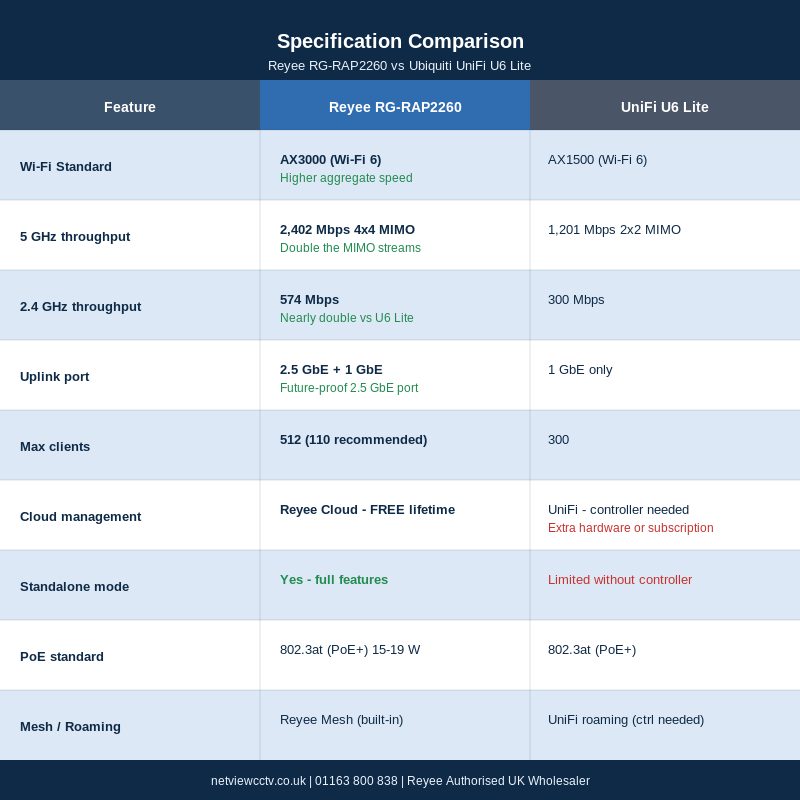
| Feature | Reyee RG-RAP2260 | UniFi U6 Lite |
|---|---|---|
| Wi-Fi standard | Wi-Fi 6 (AX3000) | Wi-Fi 6 (AX1500) |
| 2.4 GHz throughput | 574 Mbps (2×2) | 300 Mbps (2×2) |
| 5 GHz throughput | 2,402 Mbps (4×4) | 1,201 Mbps (2×2) |
| Max clients | 512 (110 recommended) | 300 |
| Uplink port | 1× 2.5 GbE + 1× 1 GbE | 1× 1 GbE |
| PoE standard | 802.3at (PoE+) | 802.3at (PoE+) |
| Cloud management | Reyee Cloud — free lifetime | UniFi Network — controller or gateway required |
| Standalone mode | Yes — no controller needed | Limited — full feature set needs controller |
| Reyee Mesh | Yes | No (uses UniFi roaming) |
RG-RAP2260 real-world performance: what the benchmark data shows
An independent Tolly Group test commissioned to compare Reyee Wi-Fi 6 APs against Ubiquiti UniFi equivalents found the RG-RAP2260(E) achieved 463 Mbps transmit at 2.4 GHz — substantially above the UniFi U6-LR in the same test — and 1,024 Mbps transmit at 5 GHz. These are representative distance measurements, not line-of-sight laboratory maximums, which makes them a closer proxy for real site performance than headline specification numbers (Broadband Buyer — Tolly Test Report for Ruijie Reyee Wi-Fi 6 APs). For CCTV installers the 5 GHz margin matters most: a 4MP H.265+ camera stream runs at around 3–6 Mbps, meaning the RG-RAP2260's 5 GHz radio can sustain 20+ wireless camera streams with headroom to spare for concurrent staff or guest Wi-Fi — a tighter scenario for the U6 Lite's narrower 2×2 radio.
Reyee Cloud vs UniFi Network: the management cost that CCTV installers overlook
Reyee Cloud is entirely free for life with no per-site or per-device licence. A single Netview-registered account manages every RG-RAP2260 you have ever deployed — firmware pushes, topology maps, live PoE port status, and remote configuration, all from a browser or the Ruijie Cloud app. For a CCTV installer running 10 customer sites, the overhead is zero beyond the time to log in. UniFi's equivalent requires a controller: either a self-hosted instance (a Raspberry Pi or spare server running the UniFi Network application), a physical Cloud Key or Dream Machine (£80–£350 of extra hardware per site), or a hosted UniFi Cloud subscription. These costs are manageable in an established UniFi practice but represent real additional spend on a Reyee-first install where Reyee Cloud already exists on the account.
Wi-Fi 6 alongside CCTV cameras: what bandwidth headroom looks like in practice
Most professional CCTV installs use wired IP cameras over Cat 5e or Cat 6, so the AP's primary role is client Wi-Fi — staff devices, guest portals, IoT sensors, door-entry keypads — rather than carrying camera streams directly. The exception is any site with wireless-bridge cameras, wire-free PTZ units, or temporary camera deployments. In those cases the 5 GHz bandwidth budget should be sized as follows: 4MP H.265+ fixed camera at 4 Mbps, 8MP H.265+ at 8–12 Mbps, motorised PTZ at 8–16 Mbps. OFDMA in Wi-Fi 6 improves handling of many low-bandwidth clients simultaneously — particularly relevant where Hikvision DS-K series door entry panels, Ajax MotionProtect sensors, or other IoT devices share the same radio. On either AP, always isolate camera traffic to a dedicated SSID and VLAN; never bridge camera and guest traffic on the same wireless segment.
When to choose the Reyee RG-RAP2260 over the UniFi U6 Lite
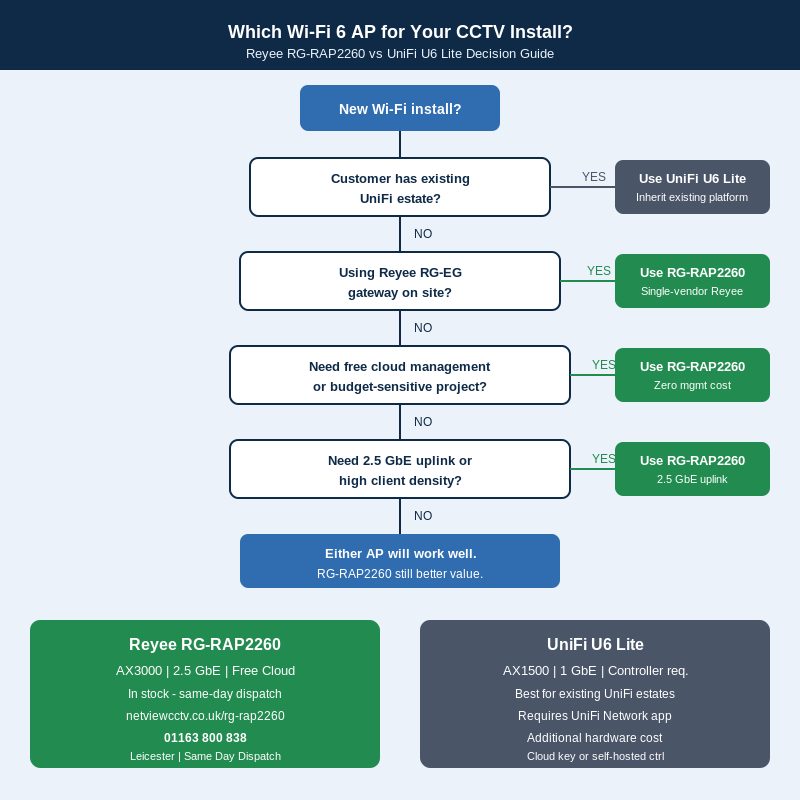
The RG-RAP2260 is the right specification when: the site already uses a Reyee RG-EG gateway and you want a single vendor, single cloud account for the entire network (see our Reyee RG-EG gateway guide for the full stack overview); the customer has no existing Wi-Fi infrastructure and you want zero controller cost; the uplink switch supports 2.5 GbE and you want the headroom for future video-analytics traffic; or the project is cost-sensitive and maximum performance per pound is the brief. The free lifetime cloud management is the single strongest business case — it removes recurring management cost from your support margin for the life of the install.
When UniFi still makes sense for a CCTV-adjacent install
UniFi is the stronger choice when the customer already has a populated UniFi estate — an existing Cloud Gateway, trained IT staff, and established VLAN policy sets. Adding Reyee APs alongside an existing UniFi controller introduces a second management plane that creates support complexity. UniFi's mature ecosystem, active community, and deep feature set (traffic inspection, IDS/IPS, network-wide statistics) also serve large, IT-managed sites better than a small CCTV installer is likely to need. The rule: inherit the existing platform where it exists; introduce Reyee on fresh installs or where the customer has no current Wi-Fi investment.
Outdoor CCTV sites: the Reyee RG-RAP6260(G) for car parks and perimeters
For car park cameras, yard coverage, or wireless backhaul between outbuildings, the Reyee RG-RAP6260(G) is the outdoor counterpart to the RG-RAP2260 — an IP68-rated AX1800 access point delivering 574 Mbps at 2.4 GHz and 1,201 Mbps at 5 GHz, with omnidirectional antennas rated to 100 m radius at 2.4 GHz (Ruijie Reyee RG-RAP6260(G) product page). Its 1× GbE + 1× SFP port combination means you can run fibre backhaul up to 20 km from the equipment room to the outdoor AP — useful on larger sites or where camera runs exceed the Ethernet 100 m limit. It supports 802.3at PoE+ input, Reyee Mesh, and joins the same Reyee Cloud account as your indoor RG-RAP2260 units. Contact Netview on 01163 800 838 to enquire about the RG-RAP6260(G).
Pairing Reyee APs with Reyee PoE switches for a single-vendor stack
The RG-RAP2260's 2.5 GbE uplink delivers its full bandwidth advantage only when the downstream switch port also supports 2.5 GbE or when the uplink is aggregated. For most sites the practical companion is either the Reyee RG-ES118GS-P 8-port gigabit PoE+ switch for small retail or domestic installs (up to 8 PoE devices, camera and AP traffic separated by VLAN on the same switch), or the Reyee RG-ES216GC-V2 16-port managed switch for mid-size sites with a 16-channel NVR and multiple APs. Both switches are Reyee Cloud-managed alongside the RG-RAP2260, so a single login covers gateway, switch, and AP from one dashboard — a real operational advantage over mixed-vendor stacks where each tier has its own management interface.
Installer FAQ: Reyee Wi-Fi 6 APs for CCTV sites
Does the RG-RAP2260 need a dedicated controller or server?
No. The RG-RAP2260 operates in full standalone mode with no controller hardware required. Commission it via the Ruijie Cloud app on your phone, and it joins your Reyee Cloud account in around three minutes. Every AP you deploy from that point is managed from the same free account — no extra hardware, no licence fee.
Can I run the RG-RAP2260 on a non-Reyee PoE switch?
Yes. The RG-RAP2260 accepts standard 802.3at PoE+ from any compliant switch — Netgear, TP-Link, Cisco, or any other manufacturer's 802.3at hardware will power it correctly. The Reyee Cloud management platform works regardless of what PoE switch is in use; you only lose the single-dashboard switch management if you step outside the Reyee ecosystem.
Is Reyee Mesh the same as UniFi roaming?
They share the same goal — seamless client handover between APs — but use different protocols. Reyee Mesh uses Ruijie's own backhaul algorithm across the RG-RAP range, while UniFi uses 802.11r fast BSS transition and proprietary UniFi roaming. In practice, both deliver acceptable roaming on a well-designed site; neither is a substitute for proper AP placement and channel planning.
How much PoE power does the RG-RAP2260 draw?
The RG-RAP2260 is rated for 802.3at PoE+ input, with a typical power consumption of around 15–19 W depending on radio load. When sizing your PoE switch budget, plan for 20 W per RG-RAP2260 port to allow headroom under full client load. An RG-ES118GS-P with its 130 W total PoE budget comfortably powers six RG-RAP2260 units plus two IP cameras on the remaining ports.
Can camera traffic and Wi-Fi client traffic be isolated at the AP level?
Yes. The RG-RAP2260 supports multiple SSIDs with VLAN tagging, so you can assign camera-stream traffic (where applicable) to VLAN 10 and guest or staff Wi-Fi to VLAN 20 at the AP, with the VLAN terminated at the upstream RG-ES216GC-V2 managed switch. This is the correct architecture for any site where camera and client traffic share a wireless segment — never bridge them on the same SSID.
Does Reyee Cloud charge for managing multiple customer sites?
No. Reyee Cloud is free for life with unlimited sites and unlimited devices on a single account. This is materially different from some competing platforms that charge per-site or per-AP fees once you pass a free-tier device limit. For a CCTV installer managing 5–20 customer sites, the total management cost with Reyee Cloud is zero beyond your own time — a real advantage over platforms that erode your support margin with monthly licence fees.
Order the Reyee RG-RAP2260 from Netview
Netview holds UK stock of the Reyee RG-RAP2260 for same-day dispatch from our Leicester warehouse. Our team can also advise on the right PoE switch and RG-EG gateway pairing for your site size. Call us on 01163 800 838, email us, or order direct at netviewcctv.co.uk. For iVMS-4200 and Hik-Connect configuration on sites where Reyee and Hikvision equipment coexist, see our iVMS-4200 installer hub and Hik-Connect hub.


About the Author


