

Reyee Cloud Remote Multi-Site CCTV: Installer Guide


At a glance
Reyee Cloud (the SMB tier of the Ruijie Cloud platform) lets a single installer manage every Reyee gateway, switch and AP across every customer site from one web dashboard or mobile app — no VPN, no port forwarding, no per-site truck rolls for basic config changes.
For a multi-site CCTV installer this means: monitor the network layer your cameras and NVRs ride on, push config changes to RG-EG gateways and RG-NBS PoE switches remotely, get email alerts when a PoE port drops a camera, and offer customers a hands-off support contract without leaving Leicester.
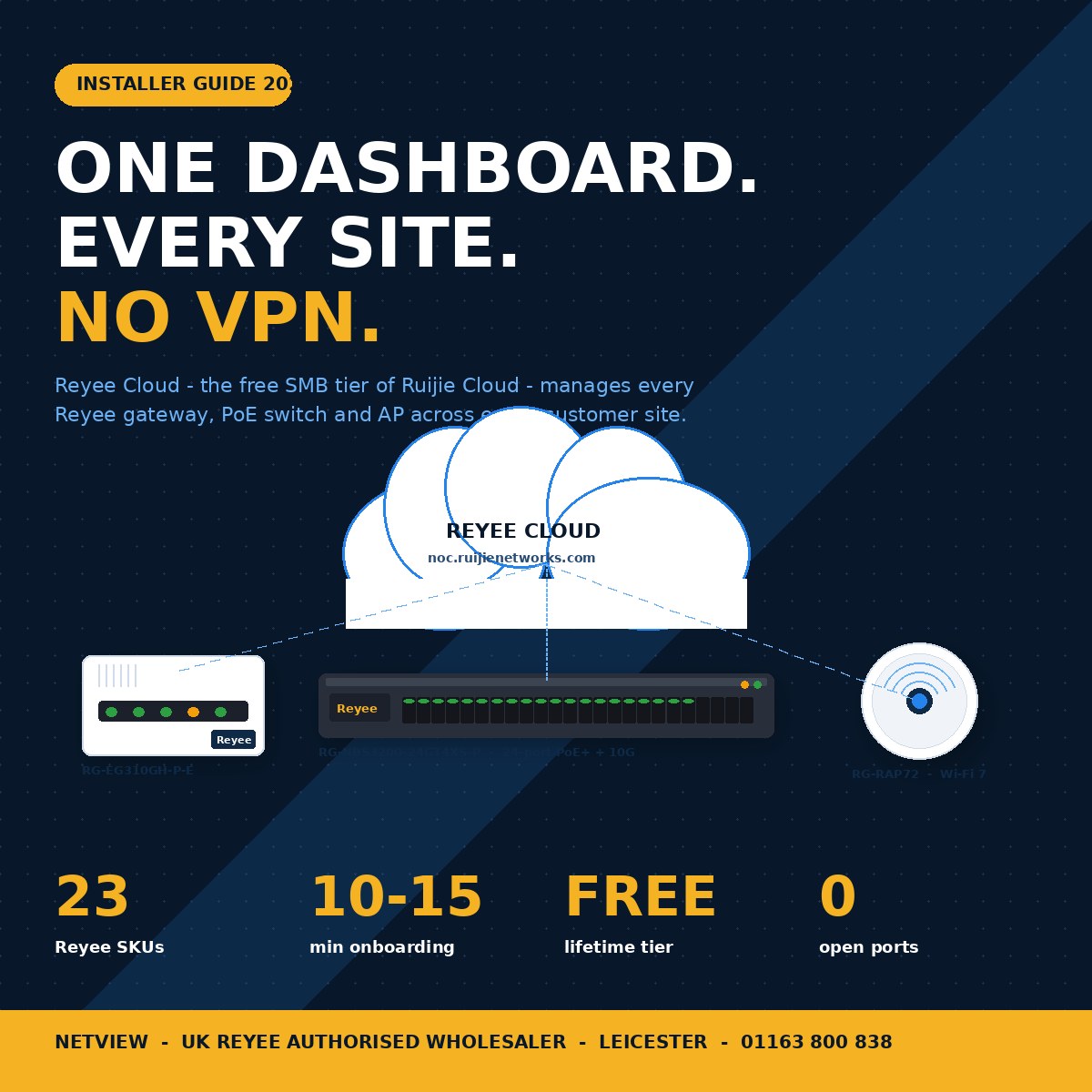
If you install Hikvision or HiLook CCTV across more than one site, the network layer is now where most of your remote-support time disappears. A camera shows offline at 09:00, the customer rings the office, an engineer drives across town, and the fault turns out to be a tripped PoE port on a Reyee switch that could have been re-enabled with two clicks from a laptop. Reyee Cloud — Ruijie's free, lifetime cloud-management platform for the Reyee SMB range — closes that gap. This guide walks UK installers through what Reyee Cloud actually does, the SKUs that plug into it, and how to set it up across multiple customer sites without an MSP licence fee.
What is Reyee Cloud and how does it differ from Ruijie Cloud Pro?
Reyee Cloud is the free, SMB-focused tier of Ruijie's cloud network-management platform; Ruijie Cloud Pro is the paid enterprise tier with AI optimisation, deeper analytics and SD-WAN.
The Reyee Cloud platform — accessed at noc.ruijienetworks.com on the web and via the Ruijie Reyee app on iOS, Android and AppGallery — handles every Reyee gateway, PoE switch and access point sold under the Reyee brand at no licence cost (Ruijie Cloud platform overview). Ruijie Cloud Pro, launched globally in 2025, sits one tier up: it adds an IT Health Dashboard, AI-driven self-healing, Network Hawkeye anomaly detection, enterprise SD-WAN, open API integration and customisable reports for SME networks that have outgrown the SMB workflow (Ruijie Cloud Pro features).
For the vast majority of UK CCTV installs — single-site offices, retail units, schools, small multi-site retailers — the free Reyee Cloud tier is the right starting point. The Pro upgrade pays back only once you are managing hundreds of clients or selling a managed-service tier yourself.
Why does multi-site CCTV need cloud network management at all?
Because the most common "camera fault" call you get isn't a camera fault — it's a network event you can resolve in seconds if you can see the topology, and in hours if you have to drive to site.
Field experience: on a typical 16-camera Hikvision AcuSense NVR install, the cameras themselves rarely fail. What does fail — and what generates the support call — is the network in between. A PoE port draws too much current and trips. A switch fan packs up and the chassis throttles. The customer reboots the router after a power cut and the static IPs on the NVR are now on the wrong subnet. Each one is a five-minute fix if you can log in remotely, and a two-hour round trip to a Loughborough industrial estate if you cannot.
The traditional answer was a VPN concentrator, a static IP at each site and a remote-desktop session. Reyee Cloud replaces all of that with a single dashboard that shows every site, every device, every port and every connected client — without opening a single inbound port on any customer firewall.
What can you see and do remotely with Reyee Cloud?
You can see live device status, port-level PoE draw, connected-client lists, throughput per port, AP signal coverage and historical alarms — and you can push firmware updates, reboot devices, toggle PoE ports and roll out config changes one device or one site at a time.
The remote toolkit covers the daily work an installer would otherwise do on site:
- Device status and topology. Every Reyee gateway, switch and AP appears on a network map with green/amber/red status. A dropped switch or AP throws an alert before the customer notices.
- Per-port PoE control. On RG-ES210GS-P 8-port PoE+ smart switches and the larger RG-ES220GS-P 16-port PoE+ smart switches, you can see which port is powering which device, how many watts it is drawing, and reboot the port to recover a stuck camera without going to site.
- Camera awareness. Ruijie Cloud recognises most IP camera brands plugged into a Reyee PoE switch and lists each camera in the device tree — so when an installer says "Hikvision camera 4 is offline", the dashboard already shows which port and which switch (Reyee CCTV solution overview).
- Cloud tunnelling for end-device access. Reyee's cloud-tunnel feature creates an outbound, encrypted relay back to any device on the LAN — NVR, camera, printer, PC — so installers can launch the Hikvision web UI of an NVR sitting behind a customer's CGNAT broadband without a VPN (Ruijie cloud-tunnel write-up).
- Bulk firmware roll-out. Schedule a firmware upgrade across every switch on every site for the same Sunday 02:00 window, rather than one-at-a-time evening visits.
- Alerts and email notifications. Configure project-level alerts for device offline, PoE overload, WAN failover and high-CPU events; route them to the office, the on-call engineer, or both.
Which Reyee SKUs plug into Reyee Cloud?
Every current Reyee gateway, PoE smart switch, NBS L2-managed switch, RAP Wi-Fi 6/7 access point and EST/AIRMETRO wireless bridge in the UK range registers to Reyee Cloud out of the box.
The router and gateway tier sets the perimeter of each site:
- Small sites (1–4 cameras + office router replacement). The RG-EG105G-V3 5-port Gigabit cloud-managed router handles up to 100 concurrent users with dual-WAN failover. For all-in-one deployments where the gateway also acts as the AP, the RG-EG105GW(T) Wi-Fi 5 router + AP combo drops the AP count by one.
- Mid-sized sites (8–16 cameras + PoE-powered desk phones or APs). The RG-EG305GH-P-E 5-port PoE+ cloud router delivers 4 PoE+ ports straight from the gateway, ideal for small offices where the router and the PoE supply are the same device.
- Larger sites (17–32 cameras + 50–300 staff). The RG-EG310GH-P-E 10-port PoE+ rack router scales to 300 users with multi-WAN and 8 PoE+ ports; for non-PoE racks, the RG-EG310GH-E 10-port cloud router is the same chassis without the PoE budget.
Switching is where the CCTV cabling actually terminates:
- RG-NBS3100-8GT2SFP-P-V2 8-port L2-managed PoE+ switch with 125 W PoE budget — the right home for 6–8 cameras + an NVR uplink.
- RG-NBS3200-24GT4XS-P 24-port L2-managed PoE+ switch with 4×10G SFP+ — covers 24 cameras + a 10G uplink to the NVR for K4/VPRO recorders running 256–384 Mbps total throughput.
- RG-NBS3100-48GT4SFP-P 48-port PoE+ L2 switch — for sites pushing toward 48 cameras or where a single switch consolidates CCTV + Wi-Fi + VoIP.
Wi-Fi access points cover the staff and guest network that often shares the building:
- RG-RAP2260 Wi-Fi 6 AX3000 ceiling AP for general office and retail coverage.
- RG-RAP2260(H) Wi-Fi 6 AX6000 ceiling AP with dual 2.5G LAN for high-density boardrooms and classrooms.
- RG-RAP72 Wi-Fi 7 BE3570 ceiling AP, RG-RAP72PRO Wi-Fi 7 BE5040 and RG-RAP73PRO Wi-Fi 7 BE14000 tri-band for sites moving to 802.11be — covered in detail in the Reyee Wi-Fi 7 AP guide.
For inter-building links — car park to gatehouse, warehouse to office, or a remote camera column — the RG-EST350G 867 Mbps wireless bridge pair (5 km range) and the long-range RG-AIRMETRO460F IP65 23 dBi CPE (1 km) both register to the same dashboard. Where Reyee PoE injection isn't practical at the wall plate, the RG-POE-AT30 passive PoE+ injector covers single-device pop-ups.
How do you onboard a new site to Reyee Cloud?
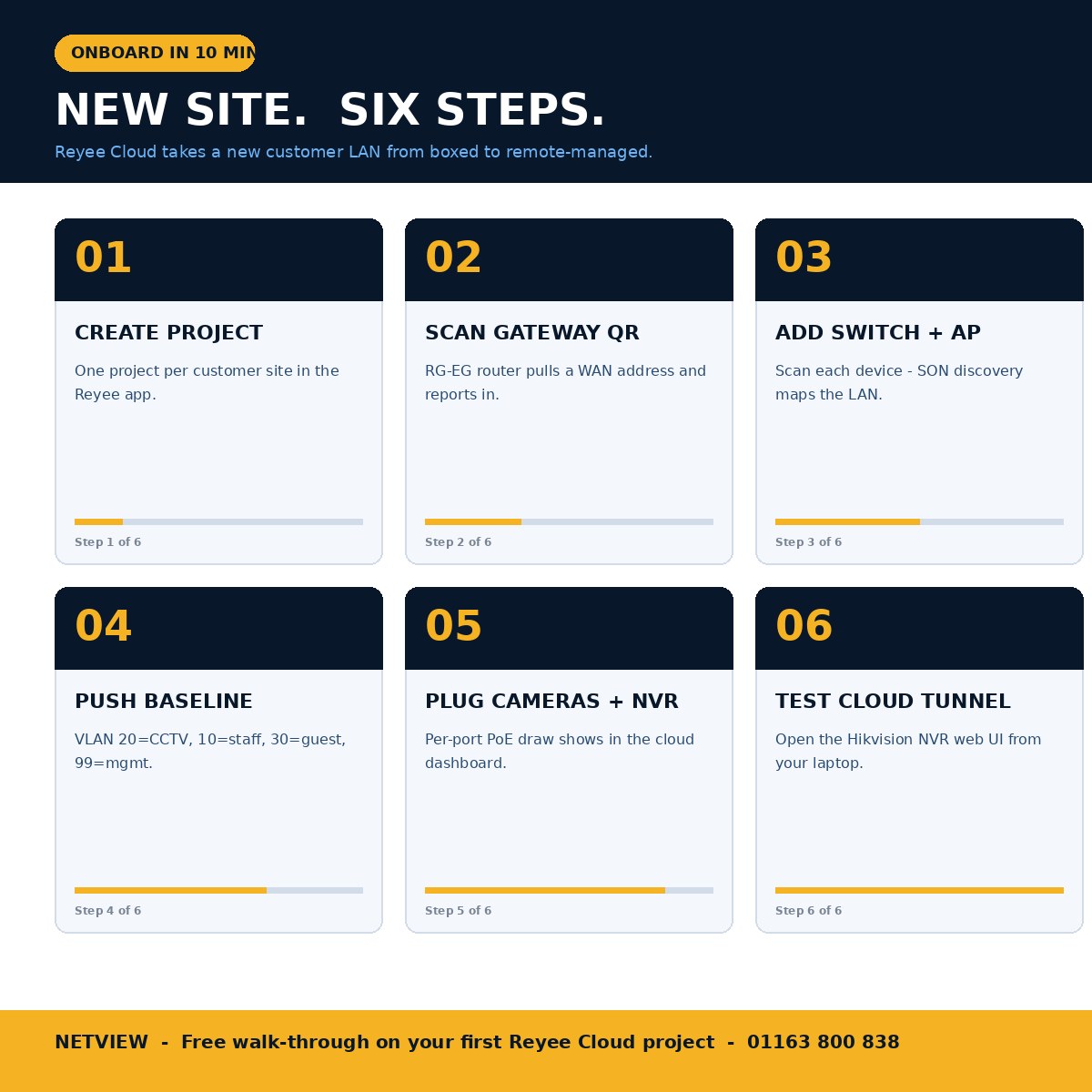
The fastest path is: scan the device QR codes with the Ruijie Reyee app on a phone, assign them to a "project" (one project per customer site), and let the platform discover the rest via the SON (Self-Organising Network) handshake.
Workflow for a typical eight-camera CCTV install with a Reyee router + Reyee PoE switch:
- Create a project in the Reyee app. Each customer site is one project; each project pins to a Ruijie Cloud account owned by the installer.
- Scan the gateway QR code first. The RG-EG router boots, pulls a WAN address, and reports in to the cloud. SON broadcasts a discovery beacon over the LAN.
- Scan each switch and AP. The platform recognises them as part of the same project and lays them out on the network map.
- Push a baseline config from a template. Set VLAN tags for CCTV (typical VLAN 20), staff Wi-Fi (VLAN 10), guest Wi-Fi (VLAN 30) and management (VLAN 99). Reyee Cloud lets you save a config template and apply it to every new project so each install ships with the same baseline.
- Plug in the cameras and NVR. The cameras pull DHCP from the Reyee gateway or the NVR's switch-side range, depending on topology. Reyee Cloud tags each camera under its parent switch port automatically.
- Test cloud tunnel. From the dashboard, open a tunnel to the NVR's web UI; log in with the installer-side iVMS-4200 or browser. If that works, your remote-support contract is now real.
The whole onboarding for a small site takes 10–15 minutes; for the multi-WAN RG-EG gateway with mixed WAN topologies, expect 25–30 minutes with the dual-WAN failover tested.
What multi-site features matter most for installers?
The features installers cite most often are project grouping, role-based access, scheduled firmware rollouts, and email/app push alerts tied to specific device events.
Project grouping. Each customer site is one project; an installer account can hold dozens of projects, each separately accessible. Customers who insist on owning their own platform account can be invited as "owners" to their own project while the installer keeps "engineer" access for support.
Role-based access (RBAC). Reyee Cloud separates four roles: owner, admin, engineer and guest. Engineers can change config and reboot devices; guests get read-only dashboards. For a multi-engineer Netview-style office, the engineer role is the right default for the on-call team.
Scheduled firmware rollout. The "schedule upgrade" workflow lets you tag every site for a maintenance window — typically 02:00 Sunday — and let the platform roll firmware out one switch at a time, with auto-rollback on health-check failure. This eliminates the "we'll need to bring you down for 30 minutes" conversation.
Alerts. The platform supports email notifications and in-app push alerts for: device offline, WAN failover, PoE overload, high CPU, AP client count threshold and config-change audit. Route alerts to the office inbox by default; bump severity to SMS or PagerDuty for after-hours via the API on Cloud Pro (Reyee email notifications GUI guide).
How does Reyee Cloud sit alongside Hikvision and HiLook CCTV management?
Reyee Cloud manages the network plumbing; iVMS-4200, Hik-Connect and HikCentral Pro manage the cameras and NVRs that sit on top of it.
This is an important boundary to get right. Reyee Cloud will not view CCTV footage, manage Hikvision firmware, or change camera settings. What it does do — and what no Hikvision tool will do — is keep the LAN healthy underneath. The two stacks meet at the switch port: Reyee Cloud tells you "port 7 dropped link"; iVMS-4200 then confirms "camera 7 has gone offline". Together they isolate fault domains in 30 seconds instead of 30 minutes.
Where it gets even tidier is the cloud tunnel: from a single Reyee Cloud session, you can open the iVMS-4200 client, point it at the NVR's LAN IP, and operate as if you were on site. For installs that pre-date Hik-Connect P2P enrolment — or where the customer has refused the Hik-Connect privacy terms — the tunnel is the cleanest workaround.
Does Reyee Cloud support NDAA-compliant builds?
Ruijie is a Chinese vendor, so for sites bound by the US National Defense Authorization Act (NDAA) the Reyee range falls outside the approved-vendor list — pair Reyee networking with NDAA-compliant CCTV only where the customer's contract permits Chinese networking gear.
The UK position is more permissive. NDAA Section 889 applies to US federal contracts and federally funded projects. UK private commercial sites are not bound by NDAA, and the Public Procurement Notice (PPN) 09/23 that restricts Hikvision on UK government-sensitive sites does not extend to networking gear from Ruijie. For the avoidance of doubt, our NDAA UK installer guide covers which categories of UK installs need to think about this and which do not.
What does Reyee Cloud security and the 2024 vulnerability disclosure mean for installers?
Ruijie patched ten cloud-platform and device vulnerabilities in late 2024 after disclosure by industrial-security firm Claroty; keep every Reyee device on current firmware via the cloud's scheduled-rollout feature.
The disclosure (CVE chains affecting Reyee OS device-to-cloud authentication and the cloud back-end itself) was patched server-side by Ruijie and device-side by firmware updates that have since been pushed via the same Reyee Cloud platform (SecurityWeek summary). The practical hygiene for installers is identical to any other connected platform: enforce strong installer-account passwords, enable two-factor on the Ruijie Cloud login, and use scheduled firmware rollouts so no site sits more than 90 days behind current Reyee OS. Document the platform in your customer handover pack so the end user knows what's connected and to whom — covered in the Hik-Connect installer setup and customer handover guide as a wider template.
What does a Netview multi-site Reyee + Hikvision starter pack look like?
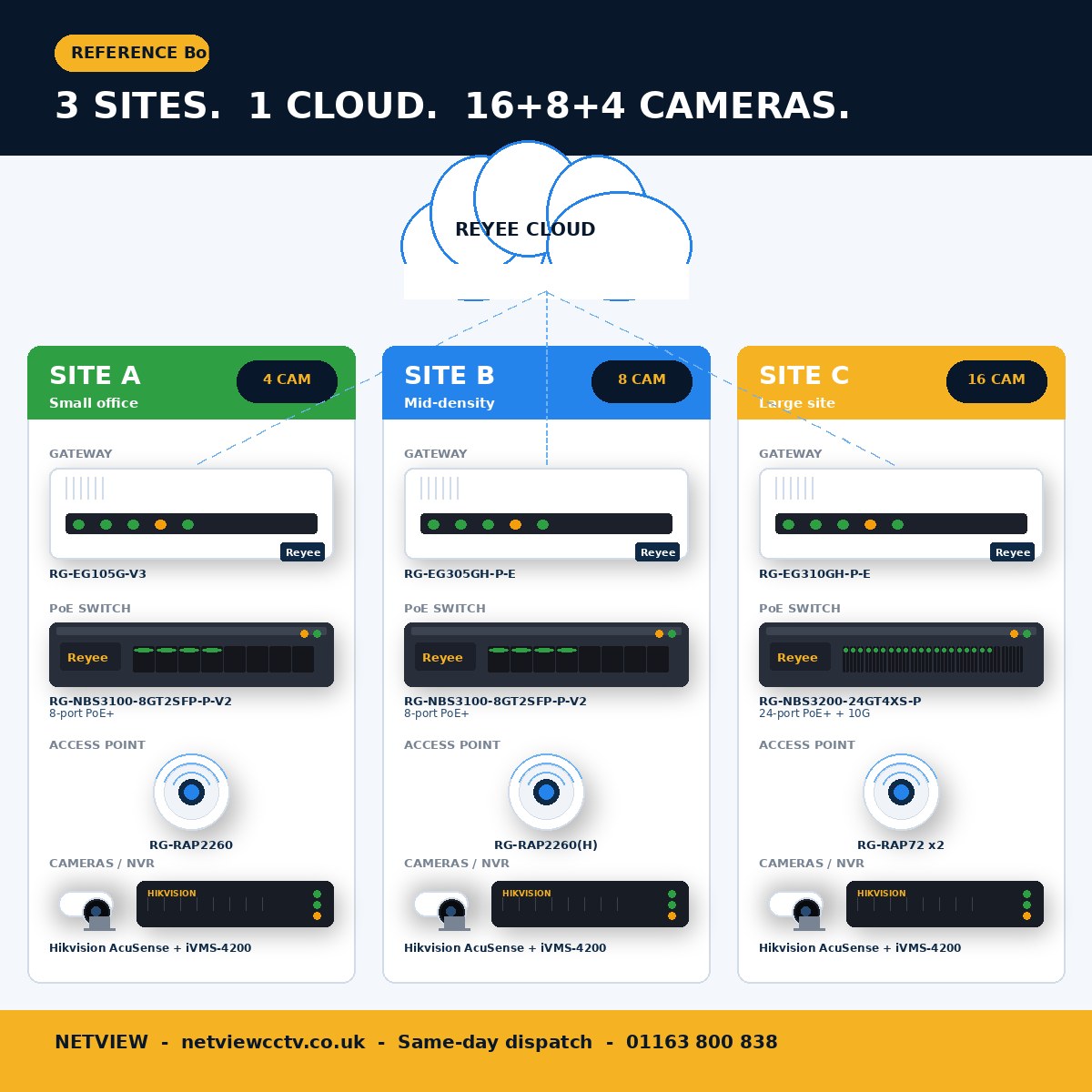
For three sites of mixed size, the typical Netview bill of materials is: one gateway per site, one PoE switch per site sized to the camera count, one or two APs per site if Wi-Fi is in scope, and a single Reyee Cloud account that ties them together.
Worked example for a three-site retail customer (4 cameras at site A, 8 cameras at site B, 16 cameras at site C):
| Site | Cameras | Gateway | Switch | AP |
|---|---|---|---|---|
| Site A (small) | 4 | RG-EG105G-V3 | RG-NBS3100-8GT2SFP-P-V2 (8-port 125 W PoE) | RG-RAP2260 ×1 |
| Site B (mid) | 8 | RG-EG305GH-P-E | RG-NBS3100-8GT2SFP-P-V2 | RG-RAP2260(H) ×1 |
| Site C (large) | 16 | RG-EG310GH-P-E | RG-NBS3200-24GT4XS-P (24-port + 10G uplink) | RG-RAP72 ×2 |
All three sites onboard to one Ruijie Cloud project group. Email alerts go to the office; the engineer-on-call gets push notifications via the Reyee app for after-hours WAN failover and offline cameras. Camera platform: a small Hikvision AcuSense NVR at each site reaches iVMS-4200 via the cloud tunnel — see the iVMS-4200 installer guide for the multi-site monitor layout.
Frequently asked questions
Does Reyee Cloud cost anything?
No. The SMB tier is free for life on any Reyee-branded device. Ruijie Cloud Pro is the paid SME/enterprise tier with AI optimisation and SD-WAN, but most CCTV installer use cases live on the free tier.
Do I need to open inbound ports on the customer's firewall?
No. Reyee devices initiate an outbound TLS connection to the Ruijie Cloud back-end on TCP 443. As long as the WAN side has standard outbound internet access, no port-forwarding or VPN is required.
Can the customer lock me out of their devices once handover is complete?
Yes. The "owner" role on a project is the highest privilege; the customer can be made owner and demote the installer to engineer or remove access entirely. Discuss the model in advance and document it in the handover pack.
What happens if Reyee Cloud is offline — do the devices keep working?
Yes. Reyee gateways, switches and APs operate from their last-known good config when the cloud is unreachable. You lose remote management until the cloud comes back, but cameras keep recording and Wi-Fi keeps serving.
Can I manage Hikvision NVRs from Reyee Cloud?
Not natively. Reyee Cloud will see the NVR as a connected client on the LAN and report its switch port and IP, but Hikvision NVR configuration still happens in iVMS-4200, HikCentral Pro or the NVR's own web UI. Reyee Cloud tunnelling makes those UIs reachable remotely.
Which switch should I pick for a 16-camera Hikvision install?
For a 16-camera mid-density site, the 24-port RG-NBS3200-24GT4XS-P is the safe choice — 370 W PoE budget covers 16 cameras with headroom and the 4×10G SFP+ uplink takes the NVR off the bottleneck path. Full sizing logic in the Reyee PoE switch sizing guide.
Order Reyee Cloud kit from Netview
Netview is a UK Reyee-authorised wholesaler based in Leicester. We hold the full Reyee gateway, switch, AP, wireless-bridge and PoE-injector range in stock for same-day dispatch, and we walk multi-site installers through their first Reyee Cloud project at no charge.
Call 01163 800 838, email the trade desk, or browse the full Reyee range at netviewcctv.co.uk/brands to spec your next multi-site install.


About the Author


